AI fluency spreads when you redesign the workflow first

Two colleagues at a standing desk in an open office study a laptop edged in jade, a picture of AI fluency built through shared work.

I’ve been reviewing Wharton’s latest AI adoption report, and I’m curious about one finding in particular. Managers and above were far more likely than entry and mid-level employees to say employees receive adequate AI training. It made me wonder how many AI fluency plans are, in practice, just course catalogs.

Courses matter, of course. What I’m less sure of is how much a course can do for someone who goes back to a team where nobody has time to try things and a good idea has no clear pathway to change formal ways of working.

What the study says about AI training and its effectiveness

The report, The Adaptive Advantage: Who’s Winning With AI and How from Wharton Human-AI Research and GBK Collective, surveyed about 1,400 people at US enterprises with 1,000 or more employees and more than $50 million in revenue. Most of the leaders in it like what they’re seeing so far. Eighty percent of managers and above report a positive return from AI, and 28% call it strongly positive. Yet only 7% of organizations clear all three of Wharton’s markers for success: proving value, transforming workflows, and aligning the organization.

On training, 78% of managers and above agree that employees receive adequate AI training. Among entry and mid-level employees, the figure is 56%, the largest gap of any readiness measure in the study. And 65% of managers and above agree that what holds their department back with AI is mostly people and processes.

I want to be careful with this because it is self-reported survey data, so it tells us what is associated with success, not what causes it. Adequate training is one of Wharton’s five alignment factors, so the report does not say training is a waste. It counts training as one factor among several. Wharton calls the organizations pulling ahead adaptive, and defines an adaptive organization as “one that rebuilds how its work gets done around AI and brings its people along with it.”

Where AI enablement grinds to a halt

In my experience, individual skill with AI is rarely the bottleneck. Most teams already have a few people who are very good with these tools. The trouble is that what they know stays with them as individual intellectual capital and has a hard time spreading to others.

Then there’s the route from a working prototype tool to everyday use. A vendor-published customer story on LangChain’s blog describes how things used to go at Workday, where “building a prototype agent took 4 to 5 months, with no guarantee it could ever reach production.” Workday then built an internal platform that handles authentication, security, compliance and infrastructure, so teams could focus on what the agent needed to do, not necessarily how to do it. According to the story, a team can now have a prototype running in a staging environment in under a day.

In my experience, building a platform like this is out of reach for most teams. The more important part of Workday’s story is why it got faster. Someone treated the path from idea to production as something worth transforming. When nobody designs that path, a capable person finishes the course, builds something useful, and then watches it sit in review for a quarter.

My read is that AI fluency spreads when people have dedicated time to experiment, a shared practice to draw from, and a clear path from prototype to daily use. A curriculum can’t supply any of that on its own. You can design those conditions, the same way you design a product.

Designing the conditions for AI fluency to shift the org.

If experimenting with AI is something people do after their real work, it mostly won’t happen. It needs protected time on the calendar, ideally with a teammate. Then tie it to an actual task from that week rather than a practice exercise in a vacuum.

Shared practice keeps every team from starting over. On a How I AI episode published on Lenny’s Newsletter, Figma PM Ezra Mechaber describes PM OS, a shared repo of 31 skills that every PM at Figma now uses. (A skill, in this sense, is a saved and reusable set of instructions for an AI tool.) The repo matters less than the habits surrounding it. It started as Mechaber’s personal setup, and now 60-plus PMs start from there. That’s how AI fluency moves past the few people who had it first.

The route out of the sandbox needs designing too. Teams should know how an experiment becomes an approved tool: who reviews it, what the reviewers look for, and roughly how long it should take. Governance also controls how fast a shared library grows. Teams have to decide how broad a shared skill should be. Broad skills cover many scenarios with some flexibility and keep the library small and manageable. Narrow skills fit one use case and can be more accurate, but they pile up into an app store nobody can browse. The backend processes and governance deserve the same research and design attention as anything a customer touches.

What to measure instead of completions

All of this is hard to see if the only thing you track is training completion. Completion rates tell you how many people sat through a module. They tell you nothing about whether a claim gets resolved faster or a monthly report needs fewer handoffs. NN/g’s guidance on establishing baselines makes the point that one of the most common ways UX teams undermine their own value is by measuring too late. Take a before-measurement on the actual workflow, before anything changes. Without it you can’t show that AI did anything. That makes a pilot that worked very hard to defend at budget time.

Where we start at Grand

Most of our AI work starts as research into how people actually do their job or how customers are engaging with a brand. For a quality team at a global manufacturer, that meant interviews and surveys with roughly 2,500 internal users to learn which proposed features would change their work and which only looked useful. We made the case for cutting the second group. For the AI itself, we designed the interface to show the risk and rationale behind what an agent was doing, not only its output, so reliance could match what the system could actually do, which is what we call calibrated trust. We started from how the work actually gets done, and the AI fit inside that.

At Grand, we believe people get fluent with AI inside work they’re allowed to change. So the work and its processes are what we redesign first, transparently and with the people who do it, and so AI has a baseline to prove its value against.


If you’re trying to get AI fluency to spread past the few people who already have it, we’d like to hear what you’re building, and we’d be glad to look at the workflow with you. Bring any in-progress ideas. Let’s connect


A human in the loop is a start, not a design strategy

Woman looking at her phone with her thumb on a toggle switch, circled by an open green hand-drawn loop

I’ve been nerding out on two things from the first week of November. The OCC published a framework for supervising AI agents, and Wells Fargo updated its online banking agreement to cover them. Both put a human in the loop on paper.

That’s a reasonable default. What I’m less sure of is whether anyone’s designing the actual human in the loop. Putting a person in the middle of an agent’s work is a policy call. What that person can actually see, approve and stop is a design call, and most of that is still open.

What the OCC wants from the human in the loop

The OCC’s framework (Bulletin 2026-54) is supervisory guidance for its examiners. It isn’t a new rule, and it’s careful to call its tiers and controls illustrative. There are a few parts in here worth taking in if you’re building digital products in the finance world.

It says human approval has to be “more than a nominal click.” It calls out alert fatigue and asks how many agents one person can credibly monitor. And it lists the controls you’d expect for anything that moves money: circuit breakers, rate limits, least-privilege permissions, kill switches.

Read as a design brief, it’s pretty specific, which is great. A human in the loop clicking approve on a steady stream of agent actions without the context to judge them isn’t really overseeing anything.

The framework also says revocation of outside agents “may be calibrated to the action requested.” That’s a control mechanism, but a person still has to know how to use it. At Grand we spend a lot of our time on calibrated trust: getting someone’s reliance on AI to match what the system can actually do.

A nominal click is what over-trust looks like from the inside. You approve because everything before it was fine. And if stopping an agent is hard to do and harder to show you did, a careful customer just won’t turn one on.

What the bank’s contract says about AI agents

Wells Fargo’s updated Online Access Agreement takes effect November 24, and a new Section 15 covers third-party AI agents. Instructions your agent gives the bank are “deemed to have been initiated and authorized directly by you, without further verification.” Using one is “at your own risk,” including when it acts on bad or manipulated inputs.

If you revoke an agent, you have to keep evidence that you did and hand it over if the bank asks. Until you notify the bank, you’re responsible for what the agent does, to the extent the law allows. The bank, for its part, can require you to register agents and can suspend or cut off their access.

Douglas Borthwick, who spent time at Morgan Stanley and Standard Chartered, told American Banker that telling a chatbot to stop “leaves nothing in the customer’s hands that anyone else can check.” In other words, there is no receipt. The contract asks the customer to keep evidence. Whether the product gives them any is still an open design question.

Two documents, one human in the loop

The regulator wants the human in the loop to be able to oversee for real, without drowning in alerts. The bank wants the customer responsible until they say stop, with evidence kept on hand. Both are fair, protective asks, and they picture the same person: someone who knows what the agent’s allowed to do and can shut it off with a record.

I don’t think most of the products I see are built for that type of person yet. The questions are just newer than the products.

I’d start with the concrete ones. An approval should transparently show the payee, the amount and why the agent picked them, so saying no takes as little effort as saying yes. An approval you can read in two seconds is also how one person keeps up with more than one agent. And a customer should be able to say in plain words what they’ve let an agent do, and have that match its real permissions.

Then there’s the receipt. It doesn’t need to be clever. A confirmation that names the agent, says what access ended and when, and matches the record the bank keeps would give a customer something to hand over. If stopping an agent means typing “stop” into a chat window, there’s nothing to hand over, which is Borthwick’s point.

The bank has screens to design here too. Registering an agent, reviewing it and cutting off its access are all moments someone on the bank’s side has to get right. A clean revocation record helps them as well, since if a dispute comes up, both sides start from the same set of facts.

Designing the loop

One thing I’ve noticed in our financial services work is that AI wins trust a little bit at a time, as long as the person retains ownership of the decision. On a trading-desk tool, the easy version would have handed traders a pricing window and told them to use it. We showed the reasoning in layers, with the boundaries behind each recommendation, and protected the trader’s own read of a fast-moving market. Most of the work was deciding which parts of the decision-making process belonged to the system and which stayed with the person.

On a wealth management engagement, we went in expecting to improve a self-service tool. What we found was that advisors and their clients didn’t want self-service at all. They wanted the relationship between them made stronger, more collaborative.

Agents raise the same question, except now the money moves without anyone touching it: which parts of a decision does the person hand over, and how do they take them back? In my experience you answer that by testing with real customers before the permissions model gets built, because it’s expensive to change once it’s in code.

The approve button, the scope screen (where the customer can review what an agent is allowed to do) and the off switch are what a customer remembers when something goes wrong. If you leave them to a disclaimer, you’ve pushed the risk onto your customers and called it consent. I think the answer is showing people the right thing at the right moment.

That trust gets decided by one person at one screen, choosing how much to let an agent do with their money. The regulator and the bank have both put that person in the loop. What’s left is designing agentic experiences they can actually steer with confidence.


If you’re working on how customers approve and revoke an agent, we’d like to hear what you’re building. Bring any in-progress ideas, and we’ll go through what we’d test before the permissions model gets built. Let’s connect.

Keeping resources human in the age of AI

Overhead black-and-white photo of eight hands reaching toward a small jade cross at the center of a torn-paper collage surface, symbolizing a shared human decision.

At Grand Studio, our mission has always been to collaborate with organizations as they address complex challenges. Recently, there’s been a strong shift in our discussions with executives and People Leaders, reflecting widespread concern about how AI will reshape work and affect employees. We are seeing that many organizations are rapidly adopting AI tools to improve efficiency and protect margins, often without a clear plan for the impact on their workforce..

In response to this challenge, Katie Palmer, our Chief People Officer for the last 8 years, has spent much of her time guiding our design team as they internally experience these digital transformations, often determining through trial-and-error best practices to address the main challenge that is frequently not the AI itself, but managing the rollout and change. Through this learning, she understands well that without creating clear guidelines and a human-centered design, employee experience can be compromised for efficiency. So in this blog, she’ll share more tips and ideas about how to ensure AI adoption succeeds because trust, clarity, and culture are protected.

AI and people operations: the real challenge

After years of leading teams in IT and consulting, what really worries me isn’t an AI robot takeover, but a growing reality: as organizations rush to optimize by pushing staff to move faster, cut costs, and increase efficiency, they accidentally erode the human connections that make workplaces successful.

New tools are fundamentally changing how HR operates. AI tools are being introduced to help HR streamline everything from recruitment and planning to communication, performance management, and team support. While some changes are overdue, the modern workplace remains complex. Employees expect intuitive tools, and leaders face increasing administrative demands.

Many HR teams have already implemented AI into their processes through resume-parsing algorithms, AI-driven sentiment analysis, and predictive analytics, and it’s getting harder to tell where the tool stops helping and starts deciding. Leaders are leaning on algorithms for calls that really need a human in the room: using AI agents to data mine, conduct screening, and decide who passes through the pipeline to get hired. Not to mention leaning on AI for layoffs and terminations, using productivity data that has not been evaluated for bias. And when a system quietly screens out a candidate or flags someone as ‘high risk,’ it’s easy for leaders to just defer to it instead of actually thinking it through.

This approach to people strategy could remove empathy and create a huge systemic risk. We all know this, but with the push for AI integration, people ops seems to be forgetting that AI learns from historical data sets, so it codifies and amplifies past human prejudice.

AI adoption also carries a growing legal dimension that leaders cannot ignore.

The U.S. Equal Employment Opportunity Commission (EEOC) and the Department of Justice have made it clear that employers are responsible for employment decisions, even if AI tools influence them.

AI systems learn from historical data. If that data reflects existing patterns of bias, inequity, or exclusion, those patterns are enforced and scaled through automated processes.

Organizations should explore the following when thinking about adopting a new AI tool into their HR process:

  • Does the tool disadvantage candidates with disabilities? For example, video-interview or gamified assessments that penalize speech patterns, eye contact, or reaction time in ways unrelated to job performance.
  • Does our vendor contract give us audit rights, data access, and indemnification, or are we accountable for a system we can’t actually inspect?
  • Are we compliant with the laws that apply to us: NYC’s bias audit law for automated hiring tools, Illinois’ AI video interview law, or similar rules wherever we operate?
  • Does this tool produce a statistically measurable adverse impact on any protected group under the EEOC’s four-fifths rule, and has anyone actually run that analysis?
  • Who owns ongoing monitoring once the tool is live?  Bias doesn’t just get checked once at launch; it needs to be re-tested as the model and applicant pool change.
  • Can we explain a rejection to the candidate or employee it affects? If the vendor’s model is a black box even to us, we can’t legally meet our own disclosure obligations.

While technology vendors supply the tools, employers retain full accountability for their use.

The cost of moving too fast

People operations is more than process execution and policy enforcement. Successful organizations thrive by actively:

  • Building and maintaining deep internal trust
  • Nurturing a strong, lived, and breathable culture
  • Rallying around a clear, compelling, and shared vision
  • Building a place where people feel safe speaking up and actually feel like they belong

If you want real alignment and sustainable growth, you can’t outsource any of these core actions to an algorithm or a software vendor. Technology can support HR operations and logistics, but it can’t replace human judgment, empathy, context, organizational values, or emotional nuance.

When leadership teams forget this truth, the day-to-day experience of work can feel cold and impersonal, or as if nobody actually cares.


I’ve seen how easily this can happen: an HR tool integrated a new AI function to help with feedback and reviews. The model pulled information from 1:1 discussions with managers and incorrectly mapped it to employees for performance reviews. Without human oversight and clear governance on AI tools, something as simple as a new software update can quickly erode trust with managers and weaken 1:1 relationships in organizations.

Your employees notice when a message feels like it came from a bot, when decisions don’t make sense, and nobody can explain why, or when tech is being used to watch them instead of help. If that is the norm,  trust erodes; the whole place starts to feel less like a team and more like a transaction. It also breeds a culture of defensiveness, because people know the system could misrepresent them at any moment over a small misunderstanding or a sweeping generalization.

Whatever temporary gains you score on the balance sheet will be rapidly wiped out by the compounding cultural damage. When organizations treat humans like variables in an optimization equation, using algorithms for hiring, performance management, or employee monitoring, engagement plummets, psychological safety erodes, and your best talent quietly checks out.

They deserve to be heard, treated fairly, and led with genuine empathy and honesty. Your teams are still starved for human leadership.

Tech Cheerleader:
The new responsibility of people leaders

As HR executives in the modern landscape, we can’t stick our heads in the sand. Our candidates are already using these tools, our employees are quietly experimenting with them, and the C-suite is aggressively asking how to roll them out to protect margins.

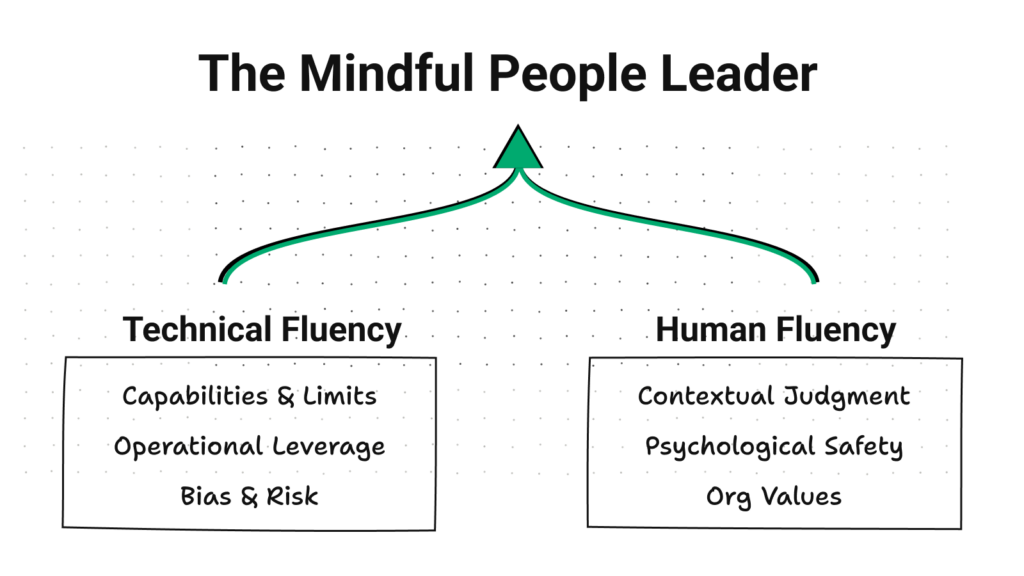
While AI is driving the urgency today, this challenge extends to our entire technology ecosystem, from our HRIS platforms to automated recruiting systems and sentiment trackers. Balancing efficiency with empathy requires People leaders to master two interconnected skill sets: Technical Fluency and Human Fluency.

Hand-drawn diagram titled "The Mindful People Leader," showing two boxes labeled Technical Fluency and Human Fluency, each feeding into a single jade arrow pointing upward. Technical Fluency lists capabilities and limits, operational leverage, and bias and risk. Human Fluency lists contextual judgment, psychological safety, and org values.

Rather than viewing these as opposing sides of a brain, think of them as complementary capabilities:

  • Technical Fluency (Understanding Capabilities & Limits): This isn’t about learning to code. It means developing a grounded, realistic understanding of what software and AI models actually do, where they generate genuine operational leverage, where their training data creates compliance or bias risks, and where their output degrades.
  • Human Fluency (Context, Empathy & Culture): This is the ability to interpret nuance, navigate emotional complexity, build psychological safety, and uphold organizational values, qualities no software vendor or algorithm can replicate.

The intersection of these two fluencies is where true leadership lives. It is precisely because you understand a tool’s capabilities and limitations (Technical Fluency) that you can accurately determine where human oversight, contextual judgment, and emotional presence must remain non-negotiable (Human Fluency).

When HR leaders actively lean into technology with this dual perspective, they do more than just streamline processes; they transform the organization’s energy.

By taking the lead on these tools, they give their teams the gift of time, replacing tedious administrative friction with space for deep, meaningful work. Ultimately, this tech-forward approach builds an adaptable workforce that feels supported rather than policed, proving that modern innovation can actually make a culture feel more human, not less.

A simple test for People leaders:

Before automating a process, ask:

  • Would an employee reasonably expect a human conversation?
  • Could the outcome materially impact someone’s career?
  • Does this interaction require empathy?
  • Does it require contextual judgment?

If the answer is yes, AI should support the process, not own it.

Automate the “busy” work

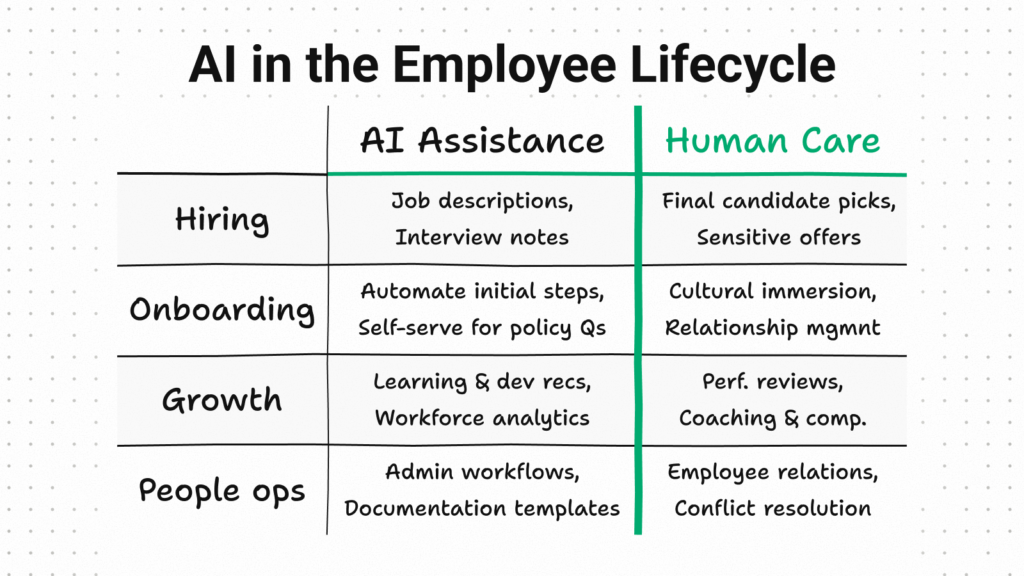
The employee lifecycle remains our most grounding framework for thinking about the people experience. As conscious people leaders, we have to pause, take a deep breath, and ask a much harder question: Just because we can automate a human interaction, should we?

When applied mindfully, the right tech can tackle a lot of the busywork that exhausts people. The purpose of AI should be clear: offload repetitive menial tasks; never automate care, connection, or leadership.

By offloading the tactical administrative burden, technology fundamentally changes the capacity of a People team. Specifically, AI excels at taking over three main operational attributes:

  • Material Creation: Drafting baseline job descriptions, training templates, and policy updates in seconds rather than hours.
  • Workflow Automation: Handling repetitive routing tasks, multi-step onboarding checklists, and basic self-service FAQs without human intervention.
  • Pattern Synthesis: Quickly pulling actionable themes out of hundreds of pages of employee feedback, exit interviews, or market compensation data.

By optimizing this operational work with AI, people leaders can free up time and energy for high-value, interpersonal work.

Hand-drawn table titled "AI in the Employee Lifecycle," contrasting AI assistance and human care across four HR stages. Hiring: job descriptions and interview notes versus final candidate picks and sensitive offers. Onboarding: automating initial steps and self-serve policy questions versus cultural immersion and relationship management. Growth: learning and development recommendations and workforce analytics versus performance reviews, coaching, and compensation. People ops: admin workflows and documentation templates versus employee relations and conflict resolution.

When we use automation to reduce operational noise, we intentionally preserve our HR teams’ bandwidth. This opens up the necessary energetic space for the deeply human work that moves the needle: coaching managers, designing intentional people strategies, supporting executive teams, and guarding the cultural health of our people.


What I’d tell any HR leader right now

It’s not AI versus people. It’s about using AI in a way that actually supports people. The organizations that get this right will be the ones that understand the technology well,  but never let it replace the human parts of their culture.

AI will change how work gets done, but it won’t change what people need to thrive: respect, doing work that matters, being treated fairly, and a real sense of belonging. Meeting those needs will always remain a human responsibility.

The best organizations won’t automate everything they can. They’ll be smart, knowing what to automate to cut out the busywork while protecting the parts of the work that matter. Those will be the companies that come out ahead, good at tech and good to their people.  

Let’s co-create your human-first strategy

You don’t have to navigate this shifting landscape alone or choose between modern innovation and culture. We partner with progressive HR leaders and C-suite executives to design custom AI readiness roadmaps, ethical governance frameworks, and intentional employee experiences that elevate your operational workflows without sacrificing your culture.

Ready to bring balance to your digital transformation?

Unsolicited Advice for Leveraging a GenAI LLM

At this point, you’re probably pretty familiar with the AI hype out there. You’ve likely read that GenAI (like DALL-E or ChatGPT) is great for generating both visual and text-based content, and AI overall can be good for identifying patterns, particularly in large data sets, and providing recommendations (to a certain degree).

But you may also be familiar with the myriad ways GenAI has gone sideways in recent months (ex: Intuit’s AI tax guidance debacle, New York City’s law-breaking chatbot, the Air Canada lawsuit, and so many more). That doesn’t mean you need to stop experimenting with it, of course. But it does mean that the folks warning about it not being ready quite yet have some valid points worth listening to. 

Having built several AI solutions, including a recent GenAI LLM (large language model) solution, here’s some unsolicited advice to consider when leveraging a GenAI LLM. 

Don’t use GenAI for situations where you need a defined answer.


As evidenced in all the examples above, GenAI chatbots will – and often do – make information up. (These are called hallucinations within the industry, and it’s a big obstacle facing LLM creators.) The thing is, this is a feature, not a bug. Creating unique, natural-sounding sentences is precisely what this technology is intended to do and fighting against it is – at least with the current technology – pointless. 

There are some technical guardrails that can be set up (like pointing the system to first pull from specific piles of data, and crafting some back-end prompts to tell it not to make things up) yet still, eventually, our bot friends will find their way to inventing an answer that sounds reasonable but is not, in fact, accurate. That is what they are meant to do. 

In situations where you need defined, reliable pathways, you’re better off creating a hardcoded (read: not GenAI) conversation pathway that allows for more freeform conversation from the user while responding with precise information. (For the technically-minded, we took a hybrid format of GenAI + NLU for our latest automation and found it quite useful for ensuring that something like following a company-specific process for resetting a password was accurate and efficient – and importantly, in that use case, also more secure.)

Know thy data—and ensure it’s right.


I know it’s been said a million times over but a pile of inaccurate, poorly-written data will provide inaccurate, poorly-written responses. GenAI cannot magically update your data to be clean and accurate – it can, over time, generate new information based on existing information and its style (which should still be checked for accuracy) but asking it to provide correct information when it’s hunting for the answer through incorrect information is an impossible task. It cannot decipher what is “right” or “wrong” – only what it gets trained to understand is right and wrong. 

It’s important then to know what the data that you’re starting with looks like and do your best to ensure it’s quality data – accurate, standardized, understandable, etc. Because barring time to properly train the data (which is a serious time commitment but well worth it for anyone wanting proprietary or custom answers), starting with a clean data set is your best bet. 

Bring the experts in early.


When people have been experimenting with the technology and potential solution for a while, there is a pressure to “get it done already” by the time the experts roll in that doesn’t allow for the necessary exploration and guardrail-setting that needs to happen, particularly in an enterprise setting where there are plenty of Legal, Compliance, Security and even Marketing hurdles to clear. 

From both personal and collected experience, it’s worth noting that often the initial in-house experimentation focuses on the technical aspects without user experience considerations, or even why GenAI might – or might not – be the right solution here.  That’s going to take a little time. So it’s worth bringing in design and/or research experts, whether in-house or consultants, alongside the initial technical exploration to do some UX discovery and help the entire sussing-out process happen in tandem with the technical exploration. This can provide a clear picture of the business case for pursuing this particular solution. 

To help out, here’s how the Grand Studio team approaches AI design & implementation, from finding where AI is worth it to keeping people using it after launch.

Interested in knowing how to start a GenAI project of your own? Drop us a line! 

Leveraging AI in User Research

Grand Studio has a long history of working with various AI technologies and tools (including a chatbot for the underbanked and using AI to help scale the quick-service restaurant industry). We’ve built our AI Experience practice to guide our work and our clients to design a future that is AI-powered and human-led and that builds on human knowledge and skills to make organizations run better and unlock greater capabilities for people. When ChatGPT hit the scene, we started experimenting right away with how it could improve our processes and make our work both more efficient and more robust. 

Given our experience with what AI is good at doing (and what it’s not), we knew we could use ChatGPT to help us distill and synthesize a large amount of qualitative data in a recent large-scale discovery and ideation project for a global client. 

Here are some takeaways for teams hoping to do something similar: 

1. Don’t skip the clean-up. As they say: garbage in, garbage out. Generative AI (GenAI) tools can only make sense of what you give them – they can’t necessarily decipher acronyms, shorthand, typos, or other research input errors. Spend the time to clean up your data and your algorithmic synthesis buddy will thank you. This can also include standardized formats, so if you think you may want to go this route, consider how you can standardize note-taking in your upfront research prep.

2. Protect your – and your client’s – data. While ChatGPT doesn’t currently claim any ownership or copyright over the information you put in, it will train on your data unless you make a specific privacy request . If you’re working with sensitive or private company data, do your due diligence and make sure you’ve cleaned up important or easily identifiable data first. Data safety should always be your top priority.

3. Be specific with what you need to know. ChatGPT can only do so much. If you don’t know what your research goals are, ChatGPT isn’t going to be a silver bullet that uncovers the secrets of your data for you. In our experience, it works best with specific prompts that give it clear guidelines and output parameters. For example, you can ask something like: 

“Please synthesize the following data and create three takeaways that surface what users thought of these ideas in plain language. Use only the data set provided to create your answers. Highlight the most important things users thought regarding what they liked and didn’t like, and why. Please return your response as a bulleted list, with one bullet for each key takeaway, with sub-bullets underneath those for what they liked and didn’t like, and why.” 

Doing the upfront human-researcher work of creating high quality research plans will help you focus on the important questions at this stage.

4. It’s true, ChatGPT gets tired. As with any new technology, ChatGPT is always changing. That being said,  the 4.0 version of ChatGP that we worked with demonstrated diminishing returns the longer we used it. Even though the prompts were exactly the same from question to question, with the input of fresh data sources each time, ChatGPT’s answers got shorter and less complete. Prompts asking for three synthesized takeaways would be answered with one or two, with fewer and fewer connections to the data sets. By the end, its answers were straight up wrong. Leading us to our final takeaway:

5. Always do an audit of the answers! Large language models like ChatGPT aren’t able to discern if the answers they provide are accurate or what you were hoping to receive. It’s also incredibly confident when providing its answers, even if they’re wrong. This means you can’t blindly rely on it to give you an accurate answer. You have to go back and sift through the original data and make sure that the answers it gives you line up with what you, the researcher, also see. Unfortunately this means the process will take longer than you were probably hoping for, but the alternative is incomplete, or incorrect answers – which defeat the purpose of synthesis in the first place and could cause the client to lose trust in you. 

Outcome: Did using ChatGPT speed up our synthesis significantly? Absolutely. Could we fully rely on ChatGPT’s synthesis output without any sort of audit or gut check? Not at all. We’ll keep experimenting with ways to incorporate emerging technologies like Generative AI into our workstreams, but always with research integrity and humans at our center. 

Interested in how GenAI might work for your organization? Drop us a line – we’d love to chat!

Human-Centered AI: The Successful Business Approach to AI

If AI wasn’t already the belle of the tech ball, the advanced generative AI tools surfacing left and right have certainly secured its title. Organizations are understandably in a rush to get in on the action — not just for AI’s potential utility to their business, but also because, more and more, demonstrating use of AI feels like a marketing imperative for any business that wants to appear “cutting edge,” or even simply “with the times.”

Sometimes, rapid technology integrations can be a boon to the business. But other times, this kind of urgency can lead to poor, short-sighted decision-making around implementation. If the technology doesn’t actually solve a real problem — or sometimes even when it does — many don’t want to change their process and use it. All this to say: a bitter first taste of AI within an organization can also harm its chances of success the next time around, even if the strategy has improved. 

At Grand Studio, we’ve had the privilege of working alongside major organizations taking their first high-stakes steps into AI. We know the positive impact the right kind of AI strategy can have on a business. But we’ve also seen the ways in which pressure to adopt AI can lead to rushed decision-making that leaves organizations worse off. 

Our top-level advice to businesses looking to implement AI: don’t lose sight of human-centered design principles. AI may be among the most sophisticated tools we use, but it is still just that — a tool. As such, it must always operate in service of humans that use it. 

A human lens on artificial intelligence

When implementing AI, it is tempting to start with the technology itself — what can the technology do exceptionally well? Where might its merits be of service to your organization? While these may be helpful brainstorming questions, no AI strategy is complete until it closely analyzes how AI’s merits would operate in conjunction with the humans you rely on, whether it be your employees or your customers.

CASE IN POINT 

In our work supporting a major financial organization, we designed an AI-based tool for bond traders. Originally, they imagined using AI to tag particular bonds with certain characteristics, making them easier for the traders to pull up. It seemed like a great use of technology, and a service that would speed up and optimize the trader’s workflow. But once we got on the ground and started talking to traders, it turned out that pulling up bonds based on tags was not actually their biggest problem. AI may be a golden hammer, but the proposed project wasn’t a nail — it only looked like one from far away. 

As we got more clarity on the true needs of these traders, we realized that what they actually needed was background information to help them make decisions around pricing the bonds. And they wanted the information displayed in a particular way that gave them not just a suggestion, but the data that led them there. In this way, they’d be able to incorporate their own expertise into the AI’s output. 

If we had designed a product based on the original assumptions, it likely would have flopped. To be useful, the AI needed to be particularly configured to the humans at the center of the problem.

The linkage points between human and AI are crucial

We all know that bad blood among employees can spell doom for an organization. Mistrust and negative energy are surefire ways to sink a ship. In many ways, integrating AI can feel a lot like hiring on a slough of new employees. If your existing employees aren’t appropriately trained on what to expect and how to work with the new crowd, it can ruin even the best-laid plans. 

Once you’ve identified where AI fits into your organization, we recommend paying extremely close attention to the linkage points between human and AI. Where must these parties cooperate? What trust needs to be built? What suspicion needs to be mitigated? How can each benefit the other in the best way possible?

CASE IN POINT

Recently, we worked with a financial services technology provider to develop AI that could spot fraud and inaccuracies in trading. We conducted in-depth research into the needs of the surveillance teams who’d be using the software to understand their role and also their expectations for how they’d use such a tool. This allowed us to thoughtfully build a visual interface on top of the AI that could maximally meet the surveillance team’s needs, including helping them with task management.

Taking the time to understand the precise nature of this potential human-AI collaboration helped us use resources wisely and prevent the mistrust and resistance that can cause even the best tools to fail. 

AI integrations require trust and understanding

Your AI also can’t be a “black box.” While not everyone at your organization needs to be an expert on its functionality, simply dropping an unfamiliar tool into a work environment and expecting people to trust whatever it spits out is very likely misguided. This is especially true when AI is helping experts do their jobs better. These roles are defined by the deep training that goes into them — how are they supposed to give an open-arms welcome to a new “employee” whose training they can’t see or understand?

For example, a doctor trained in reviewing mammograms may well benefit from AI software that can review 500 scans and whittle it down to only 20 that need human assessment. But you can imagine a physician’s resistance to simply taking those 20 images without understanding how and why the software weeded out the other 480. They rely on their expertise to save lives, and need to trust that whatever tools are helping them are supported by similar training and values. 

AI has the power to make big change. But if we don’t center humans in our implementations, the change we make may not be the good kind. 

Contemplating your early steps into AI? We’d love to work with you to help make your leap into the future a smart one. 

Using AI in Enterprise

AI is everywhere these days. There’s no escaping it whether it’s a board room conversation, a conference, or a meme on social media. And with good reason. As Bryan Goodman of Ford Motor Company said recently at the 2023 Reuters Momentum conference on AI, “I can’t imagine anyone being competitive without AI.” The resounding perspective across industries is in agreement with him.

The question amongst many people, particularly those in larger enterprise organizations with less scrappy flexibility and more risk, is how do we use AI in a way that is responsible to our business units, our shareholders, and humanity at large?

Download our whitepaper and read more about the best use cases and challenges to consider for enterprise AI usage.